
Description
Bluetooth Calling
-
Bluetooth Calling – Comprehensive 2500-Word Description
1. Introduction to Bluetooth Calling
Bluetooth Calling is a wireless communication technology that enables users to make and receive phone calls through devices connected via Bluetooth. Unlike traditional calls made directly on a mobile phone, Bluetooth Calling allows users to answer calls on compatible accessories such as smartwatches, wireless earbuds, car infotainment systems, and other Bluetooth-enabled devices.
This technology enhances convenience and mobility, offering hands-free communication and seamless integration between smartphones and peripheral devices.
2. Understanding Bluetooth Technology
Bluetooth is a short-range wireless communication protocol designed to exchange data over distances typically up to 10 meters (33 feet). Originally developed in the 1990s, Bluetooth has evolved through multiple versions to improve speed, range, and connectivity reliability.
Key Bluetooth Versions Relevant to Calling:
-
Bluetooth 2.1 + EDR: Introduced basic audio profile support.
-
Bluetooth 4.0 (Bluetooth Low Energy): Improved energy efficiency.
-
Bluetooth 5.0 and above: Offers longer range, higher bandwidth, and better connection stability, enhancing voice call quality.
Bluetooth Calling depends on profiles—predefined protocols that standardize how devices communicate. The primary profile for calls is the Hands-Free Profile (HFP), which allows a device to control call functions remotely.
3. How Bluetooth Calling Works
Bluetooth Calling works by wirelessly connecting a mobile phone with a compatible device, such as a smartwatch or wireless headphones, through Bluetooth. When a call is received or initiated on the phone, the audio and call control signals are transmitted to the connected device.
The process involves:
-
Pairing: The smartphone and Bluetooth device establish a secure connection.
-
Call Routing: Incoming call audio is routed from the phone to the connected device.
-
Microphone & Speaker Use: The peripheral device’s microphone and speaker handle the conversation.
-
Call Controls: Users can answer, reject, mute, or end calls using the connected device.
For smartwatches with Bluetooth Calling, this means you can talk directly through the watch, eliminating the need to pull out your phone.
4. Benefits of Bluetooth Calling
A. Hands-Free Convenience
Bluetooth Calling enables hands-free communication, which is especially valuable while driving, exercising, or multitasking.
B. Improved Mobility
Users can stay connected without carrying their phone in hand, pocket, or bag. This freedom improves safety and convenience.
C. Enhanced Productivity
Professionals can manage calls discreetly during meetings or on the move using smartwatches or earbuds.
D. Better Integration
Bluetooth Calling integrates with voice assistants (Siri, Google Assistant), allowing voice commands to initiate or answer calls.
E. Energy Efficient
Modern Bluetooth protocols use low-energy transmissions, extending battery life on connected devices.
5. Devices Supporting Bluetooth Calling
-
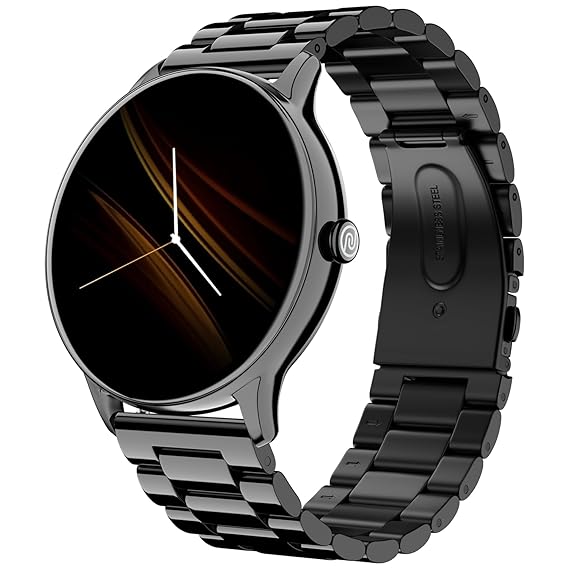
Smartwatches: Devices like the Noise Twist Go Round allow direct calling from the wrist.
-
Wireless Earbuds and Headphones: Brands like Apple AirPods, Bose, and Sony support Bluetooth Calling.
-
Car Infotainment Systems: Bluetooth Calling allows hands-free car conversations.
-
Bluetooth Speakers with Mic: Some portable speakers support answering calls.
-
Fitness Bands and Wearables: Entry-level devices with Bluetooth Calling features.
6. Bluetooth Calling Profiles and Protocols
Bluetooth calling functionality depends on several profiles and protocols:
-
Hands-Free Profile (HFP): Core protocol for call management.
-
Headset Profile (HSP): Simplified profile primarily for mono headsets.
-
Advanced Audio Distribution Profile (A2DP): Used for high-quality audio streaming.
-
Audio/Video Remote Control Profile (AVRCP): Allows control of call volume and playback.
Modern devices combine these profiles for seamless communication and media handling.
7. Quality Factors Affecting Bluetooth Calls
Several factors influence Bluetooth call quality:
A. Bluetooth Version
Newer Bluetooth versions offer improved bandwidth and lower latency.
B. Device Hardware
Microphone quality, speaker quality, and noise-cancellation tech impact call clarity.
C. Interference
Wireless interference from Wi-Fi, other Bluetooth devices, or physical barriers can affect connection stability.
D. Distance
Bluetooth has an effective range of about 10 meters; exceeding this can cause call drops.
E. Battery Life
Low battery on connected devices can degrade performance.
8. Use Cases of Bluetooth Calling
A. Driving
Hands-free calls improve safety by allowing drivers to keep both hands on the wheel.
B. Fitness and Outdoor Activities
Runners, cyclists, and gym-goers can communicate without interrupting their activity.
C. Work Environment
Professionals use Bluetooth Calling to stay connected while multitasking or during meetings.
D. Everyday Convenience
Bluetooth Calling enables users to manage calls while cooking, cleaning, or relaxing.
9. Setting Up Bluetooth Calling
Step 1: Enable Bluetooth on Both Devices
Turn on Bluetooth on your smartphone and the accessory.
Step 2: Pair Devices
Select the device from the phone’s Bluetooth menu and confirm pairing.
Step 3: Grant Necessary Permissions
Allow access to contacts and call audio.
Step 4: Test a Call
Make or receive a call to ensure proper functioning.
10. Troubleshooting Bluetooth Calling Issues
-
Connection Drops: Move closer or reduce interference.
-
Poor Audio Quality: Check microphone/speaker, update firmware.
-
Pairing Failures: Reset Bluetooth settings or unpair/re-pair devices.
-
Call Controls Not Working: Ensure device supports full HFP profile.
11. Security and Privacy in Bluetooth Calling
Bluetooth connections are secured via pairing codes and encryption to prevent unauthorized access. However, users should remain cautious of:
-
Unknown pairing requests
-
Public Bluetooth networks
-
Keeping firmware updated to patch vulnerabilities
12. Future Trends in Bluetooth Calling
A. Improved Audio Quality
Advances like Bluetooth LE Audio promise higher-quality calls with lower power consumption.
B. AI Integration
AI-powered noise cancellation and voice recognition will enhance call clarity and usability.
C. Expanded Device Ecosystem
More IoT devices, wearables, and smart home gadgets will support Bluetooth Calling.
D. Multi-Device Connectivity
Simultaneous connections to multiple devices will enable seamless switching.
13. Conclusion
Bluetooth Calling revolutionizes how we communicate by providing flexible, hands-free, and high-quality call experiences across a growing array of devices. As Bluetooth technology advances, users will enjoy even greater convenience, audio fidelity, and integration.
From smartwatches that let you talk on the go to wireless earbuds that free your hands, Bluetooth Calling continues to transform everyday communication for work, fitness, driving, and beyond.
If you want, I can also prepare this as a blog post, technical paper, or marketing material! Just let me know.
-


Reviews
There are no reviews yet.