
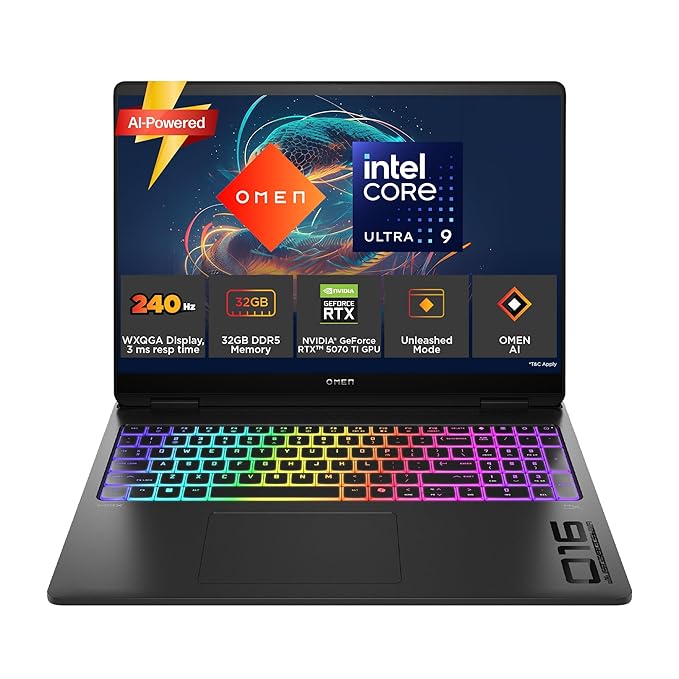
Processor, Memory & Storage: Intel Core Ultra 9 275HX (up to 5.4 GHz with Intel Turbo Boost Technology, 36 MB L3 cache, 24 cores, 24 threads)| Memory: 32 GB DDR5-5600 MT/s (2 x 16 GB)| Storage: 1 TB PCIe Gen4 NVMe M.2 SSD
HP Omen 16 Max,Intel Ultra 9 275HX,12GB NVIDIA RTX 5070 Gaming AI Laptop (32GB DDR5,1TB SSD) 60-240 Hz,3Ms,IPS,WQXGA,16”/40.6Cm,Win11,M365 Basic (1year), Office24,Black,2.75Kg,RGB Backlit,ah0190TX WITH WQXGA Display
314752 ₹ Original price was: 314752 ₹.272990 ₹Current price is: 272990 ₹.
Category: GAMING LAPTOP
Description
WQXGA Display
-
The Pinnacle of Clarity: A Deep Dive into the WQXGA Display on the HP Omen 16 Max Gaming Laptop
Introduction: Defining the Standard
In the realm of high-performance gaming laptops, the display is the final, critical gateway between the immense computational power within and the sensory experience of the user. It is the canvas upon which every frame, every texture, and every victory is painted. Among the alphabet soup of display resolutions—HD, FHD, QHD, UHD—one designation stands out for its optimal balance of pixel density, performance, and visual fidelity: WQXGA.
The acronym WQXGA stands for Widescreen Quad Extended Graphics Array. To deconstruct this:
-
Widescreen (W): Denotes a 16:10 aspect ratio, a notable shift from the more common 16:9 “widescreen” format.
-
Quad Extended Graphics Array (QXGA): Signifies a resolution of 2560 x 1600 pixels. This is precisely four times the pixel count of the legacy XGA standard (1280 x 800 pixels).
When integrated into a powerhouse like the HP Omen 16 Max, equipped with an Intel Ultra 9 275HX processor and an NVIDIA GeForce RTX 5070 GPU, the WQXGA display transforms from a mere specification into the centerpiece of an immersive experience. This analysis will dissect every aspect of this display technology, explaining why it represents the current sweet spot for serious gamers and creators.
Chapter 1: The Technical Anatomy of WQXGA (2560 x 1600)
1.1 Pixel Density and the 16:10 Advantage
A resolution of 2560 x 1600 on a 16-inch diagonal screen results in a pixel density of approximately 188 pixels per inch (PPI). This is a significant leap over the more common 1920 x 1080 (FHD) resolution on the same size screen, which yields about 142 PPI. The practical implication is a dramatic reduction in the visibility of individual pixels. Imagery and text appear exceptionally sharp, jagged edges (aliasing) are minimized, and the overall picture is “cleaner” and more lifelike.The 16:10 aspect ratio is a key differentiator. Compared to the ubiquitous 16:9 ratio:
-
Vertical Real Estate: It provides extra vertical space. This is invaluable for productivity tasks, allowing you to see more lines of code, more tracks in a digital audio workstation (DAW), or more of a webpage or document without scrolling.
-
Gaming Immersion: In games, the taller field of view can offer a tactical advantage, revealing more of the game world above and below the standard 16:9 viewport. While some games may require careful field-of-view (FOV) adjustment to avoid distortion, the overall effect is often a more encompassing experience.
-
Modern Standard: The 16:10 ratio is increasingly becoming the premium standard for laptops, moving away from the more cinematic 16:9.
1.2 Contrasting Resolutions: WQXGA vs. The Competition
To understand WQXGA’s position, we must place it on the resolution spectrum:-
FHD (1920 x 1080): The longstanding baseline. Offers the highest frame rates due to lower graphical load but can appear soft or pixelated on a 16-inch screen, especially to a discerning eye.
-
QHD/2K (2560 x 1440): A very popular and excellent balance for gaming. WQXGA (2560 x 1600) has the same horizontal resolution but adds 160 extra vertical pixels. This makes it superior for non-gaming tasks and provides a unique aspect ratio.
-
UHD/4K (3840 x 2160): The pinnacle of sharpness. On a 16-inch screen, the PPI is incredibly high (~282 PPI). However, this comes at a massive performance cost. Driving modern games at 4K with high frame rates is exceptionally demanding, even for an RTX 5070. It often requires using technologies like NVIDIA DLSS (Deep Learning Super Sampling) and can lead to trade-offs in graphical settings or frame rates.
Conclusion: WQXGA sits perfectly between QHD and 4K, offering a tangible sharpness improvement over FHD and QHD without the punishing performance requirements of 4K.
Chapter 2: The Synergy with High-Refresh-Rate (240Hz) and Low Response Time (3ms)
A high resolution alone is not sufficient for gaming. The magic of the HP Omen 16 Max’s display lies in the combination of WQXGA with a blistering 240Hz refresh rate and a rapid 3ms gray-to-gray (GtG) response time.
2.1 The 240Hz Advantage
The refresh rate (measured in Hertz, Hz) is the number of times the screen updates with a new image per second.-
60Hz: Standard for basic displays. Adequate for casual use but feels choppy in fast-paced games.
-
144Hz/165Hz: The sweet spot for mainstream gaming. Provides very smooth motion and a significant competitive edge. WQXGA Display
-
240Hz: The domain of elite esports and high-performance gaming. The motion clarity is exceptional. Every movement, from a quick flick shot in a first-person shooter to a fast-paced camera pan in a racing game, is rendered with buttery smoothness. It reduces motion blur and makes tracking fast-moving targets easier. For the RTX 5070, achieving high frame rates (e.g., 150-240 FPS) in many popular competitive titles (like Valorant, CS:GO, Apex Legends) at WQXGA is a realistic target, allowing players to fully utilize this 240Hz capability. WQXGA Display
2.2 The 3ms Response Time
Response time is the speed at which a pixel can change from one color to another, specifically from one shade of gray to another (GtG). A slow response time leads to ghosting—trailing artifacts behind moving objects.-
A 3ms rating is excellent for an IPS panel. It ensures that pixel transitions are fast enough to keep up with the 240Hz refresh rate, minimizing ghosting and ensuring a crisp, clear image even during the most frantic action. This combination is crucial for maintaining the integrity of the high-resolution, high-refresh-rate image.
The Trinity of Performance: The WQXGA resolution, 240Hz refresh rate, and 3ms response time form a holy trinity for gamers who refuse to compromise. You get sharp detail, incredibly smooth motion, and minimal blur—all simultaneously. WQXGA Display
Chapter 3: The IPS Panel Technology WQXGA Display
The Omen 16 Max utilizes an IPS (In-Plane Switching) panel. This technology is chosen for its superior qualities compared to older TN (Twisted Nematic) or VA (Vertical Alignment) panels:
-
Superior Color Accuracy and Consistency: IPS panels produce more vibrant and accurate colors, which are consistent across the entire screen. This is vital for content creators (photo/video editing) and enhances the visual richness of games. WQXGA Display
-
Excellent Viewing Angles: Colors and contrast remain stable even when viewed from sharp angles, unlike TN panels which suffer from significant color shifting. This makes it ideal for shared viewing or just moving around while using the laptop.
-
The Trade-off: Historically, IPS panels had slower response times than TN panels. However, modern “Fast IPS” technology, as likely used in the Omen 16 Max, has largely closed this gap, achieving response times like 3ms that are more than adequate for competitive gaming. WQXGA Display
Chapter 4: Practical Implications for the User
4.1 For the Gamer:
The WQXGA display on the Omen 16 Max is a strategic tool. In single-player, narrative-driven games (e.g., Cyberpunk 2077, Elden Ring), the high resolution makes worlds stunningly detailed and immersive. In competitive multiplayer, you can run the game at a lower native resolution (like FHD) for maximum frame rates, or use the full WQXGA with the help of DLSS to achieve a great balance of visual quality and high FPS to leverage the 240Hz smoothness. WQXGA Display4.2 For the Creator:
The 2560 x 1600 resolution provides ample screen real estate for editing timelines, layers, and code. The color fidelity of the IPS panel ensures that work is accurate. The combination makes the laptop a capable mobile workstation for photo editing, video editing, and design work.4.3 The Performance Consideration:
It is crucial to acknowledge that rendering at 2560×1600 is more demanding than at 1920×1080. The NVIDIA RTX 5070 GPU is a powerful mobile graphics card designed to handle this resolution proficiently. Technologies like NVIDIA DLSS are critical here. DLSS uses AI to upscale a lower-resolution image to the native WQXGA resolution, providing a massive performance boost with minimal, often imperceptible, WQXGA Display loss in image quality. This allows the system to maintain high frame rates even in the most demanding titles. WQXGA Display
Conclusion: The Optimal Viewing Experience
The WQXGA display is not just a bullet point on a spec sheet for the HP Omen 16 Max; it is the defining feature that unlocks the full potential of the hardware within. It represents a carefully calculated equilibrium:
-
It provides exceptional sharpness without the performance ceiling of 4K. WQXGA Display
-
It offers a more productive aspect ratio without sacrificing gaming immersion. WQXGA Display
-
It pairs high resolution with an elite refresh rate and fast response, a combination that was rare just a few years ago. WQXGA Display
For the user seeking a single machine that excels at high-fidelity gaming, competitive esports, and serious content creation, the WQXGA display is the ideal window into that experience. WQXGA Display It is a testament to the principle that the best technology is not always about the highest number, WQXGA Displaybut about the most intelligent and balanced integration of components. In the case of the HP Omen 16 Max, the WQXGA display is precisely that—an intelligent, balanced, and breathtakingly good visual interface. WQXGA Display
-
Be the first to review “HP Omen 16 Max,Intel Ultra 9 275HX,12GB NVIDIA RTX 5070 Gaming AI Laptop (32GB DDR5,1TB SSD) 60-240 Hz,3Ms,IPS,WQXGA,16”/40.6Cm,Win11,M365 Basic (1year), Office24,Black,2.75Kg,RGB Backlit,ah0190TX WITH WQXGA Display” Cancel reply
Related products
-
Sale!

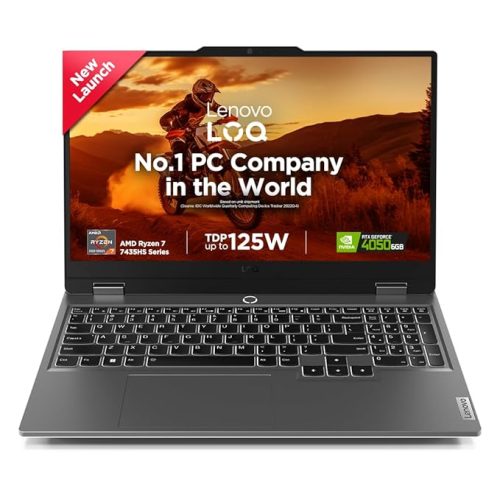
Lenovo Smartchoice LOQ AMD Ryzen 7 7435HS, NVIDIA RTX 4050-6GB, 24GB RAM, 512GB SSD, 15.6″/39.6cm, Windows 11, MS Office Home 2024, Grey, 2.4Kg, 83JC00EGIN, 100% sRGB, 3 Mon. Game Pass Gaming Laptop with fast charging
110890 ₹Original price was: 110890 ₹.81490 ₹Current price is: 81490 ₹. -
Sale!


HP Victus, 13th Gen i7-13620H, 6GB RTX 4050 (16GB DDR4, 512GB SSD) FHD, 144Hz, IPS, 15.6”/39.6cm, Win11, M365* Office24, Mica Silver, 2.29kg, fa2100TX/2103tx, Backlit, Enhanced Cooling, Gaming Laptop with Smart Technology
103018 ₹Original price was: 103018 ₹.87990 ₹Current price is: 87990 ₹. -
Sale!

ASUS Gaming V16 (2025) WITH Large battery
76566 ₹ – 87990 ₹Price range: 76566 ₹ through 87990 ₹Select options This product has multiple variants. The options may be chosen on the product page Details
Reviews
There are no reviews yet.